Free
$0.00
Every free feature on this page, on as many sites as you like.
- Unlimited sites

Zinn® Backups Pro
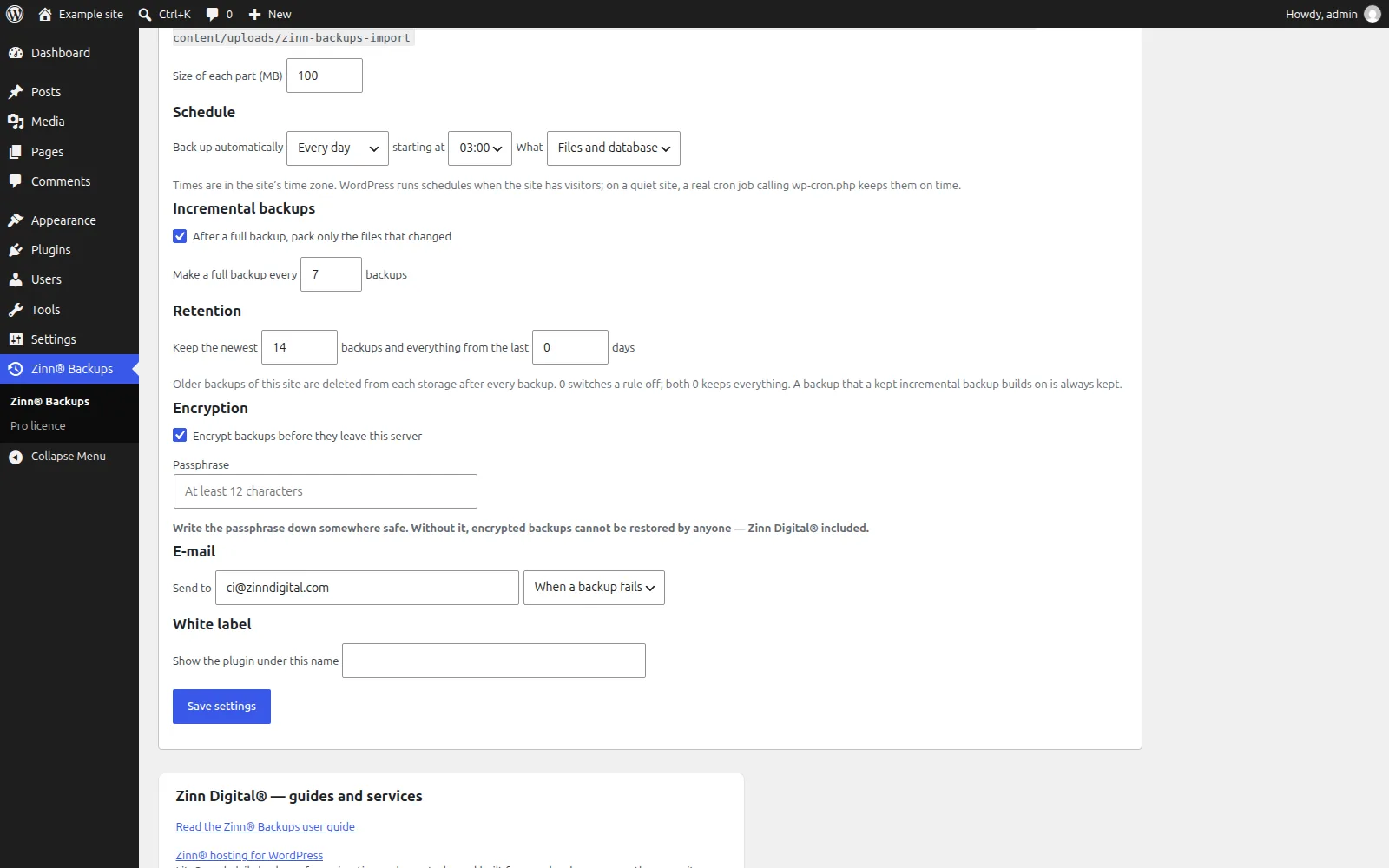
Zinn® Backups Pro adds to the free Zinn® Backups plugin: schedules, several storages at once, incremental backups, encryption with your own passphrase and retention rules that never break a chain.
Built for speed and SEO. Zinn® Backups Pro adds 0 kB and 0 third-party requests to a page. Measured, not claimed. See the numbers →
Zinn® Backups Pro is an optional paid upgrade, from $49.00 a year, with a 14-day free trial. Zinn® hosting includes the free Zinn® Backups; this Pro edition is bought separately, for sites hosted with us or anywhere else.
Hosting customer? Get 50% off your first payment of Zinn® Backups Pro. Get your code in the dashboard →
Page speed affects where Google ranks a page and how many visitors stay on it. So instead of telling you Zinn® Backups Pro is light, we installed it on a clean WordPress test site and measured what it adds to a page.
Measured on 2026-10-01: Zinn Backups 1.0.0 on a clean WordPress test site, using Lighthouse's test for phones, run 5 times and taking the middle result. Page weight counts everything a visitor's browser downloads within 15 seconds, including after a scroll. Every result, and how we measured it
Hourly to monthly, at the hour you choose, with incremental backups so each run only packs what changed.
Send each backup to up to ten of your own storages at once — R2, S3, Dropbox, Google Drive — so losing one never loses the backup.
Files are encrypted on your server with your passphrase before upload. Nobody with access to the storage can read them.
Zinn® Backups Pro installs on top of the free Zinn® Backups plugin and makes backups run themselves: on a schedule, to several of your own storages at once, incremental after the first full copy, encrypted with your own passphrase, and tidied up by retention rules that never break a chain. It also adds a one-time code for copying a backup to another site, e-mail notices and a white label for agencies. It is sold as an annual licence through Freemius, for one site, five sites or unlimited sites, with a 14-day free trial and no card needed.
A backup you have to remember to make is a backup that is missing on the day you need it. Pro runs on its own schedule, keeps a copy in more than one place, and encrypts it before it leaves the server. Restoring stays in the free plugin on purpose: if a licence ever lapses, every backup you made can still be restored.
7 free features and 8 more in Pro, listed from the plugin itself, so this page changes when the plugin does.
Everything in the free plugin stays free. Pro adds the rest, on top of it.
| Free | Pro | |
|---|---|---|
| Your own storage | Yes | Yes |
| Nothing kept on the server | Yes | Yes |
| Short, resumable steps | Yes | Yes |
| Several storages at once (Pro) | No | Yes |
| Scheduled backups (Pro) | No | Yes |
| Incremental backups (Pro) | No | Yes |
| Retention rules (Pro) | No | Yes |
| Encryption with your passphrase (Pro) | No | Yes |
| E-mail notices (Pro) | No | Yes |
| White label (Pro) | No | Yes |
| An atomic database swap | Yes | Yes |
| Checked before it is restored | Yes | Yes |
| Imports from other plugins | Yes | Yes |
| Moves the site address for you | Yes | Yes |
| Copy a backup to another site (Pro) | No | Yes |
Prices in US dollars, per year, charged by Freemius, the licensing service we sell through. Every paid plan starts with a 14-day free trial with no card needed.
$0.00
Every free feature on this page, on as many sites as you like.
$49.00per year
$99.00per year
$199.00per year
Hosting customer? Get 50% off your first payment of Zinn® Backups Pro. Get your code in the dashboard →
The facts about the file, the requirements and how to install it.
WordPress 6.6 or later, PHP 8.2 or later, and the free Zinn® Backups plugin, which Pro builds on. Encryption needs the Sodium extension, which PHP includes by default. Schedules run on WordPress's own scheduler, so a site that gets visitors (or a real server cron) runs them on time.
Buy it here, or start the 14-day free trial with no card. Freemius handles the checkout, the licence and the updates. Install Zinn® Backups Pro next to the free plugin, activate your licence, then set schedules, retention and encryption on Zinn® Backups → Settings. Pro is not included with Zinn Digital® hosting, which already backs up every site daily.
No. Pro installs on top of it. The free plugin keeps making, restoring and importing backups; Pro adds schedules, several storages, incremental backups, retention, encryption, deploy codes, e-mail notices and white label.
Yes, 14 days on every plan, with no card needed. Start it from this page.
Schedules and the other Pro features stop, and nothing is deleted. Restoring is part of the free plugin, so every backup you made — encrypted ones too, with the passphrase — can still be restored.
No. Every site we host already gets our own daily backups. Pro is bought separately for backups to your own storage, and hosting customers get a one-off discount on their first payment.
Only in the storage you connect — your own Cloudflare R2, Amazon S3 or S3-compatible bucket, Dropbox or Google Drive. Nothing is kept on your web server and nothing is sent to us.
On a site we host, these plugins are configured to update themselves: they check with us and WordPress installs the new version for you, with the download verified against its published checksum first. On a WordPress we do not host, there is nothing to configure and nothing phones home — come back to this page when you want the newest version, or watch the plugin's GitHub releases.
Customers can download the newest release of each of the two previous major versions of every plugin in the Zinn Digital® app. It is there for a site that cannot run the current version yet — one still on an older WordPress or PHP — and for rolling back an update that caused a problem. When you can, install the current version.
Zinn® Backups Pro runs on any WordPress site, wherever it is hosted. Every WordPress site we host also comes with our free plugins already installed.