Zinn® Boards

Run client work where your clients can see it

A project board built for agencies and their customers. You keep the internal detail; they get a live view of progress, a place to ask, and a way to raise a request — from a link you paste anywhere. Automations, AI drafting, GitHub sync and a full API come with it.

One board, two audiences

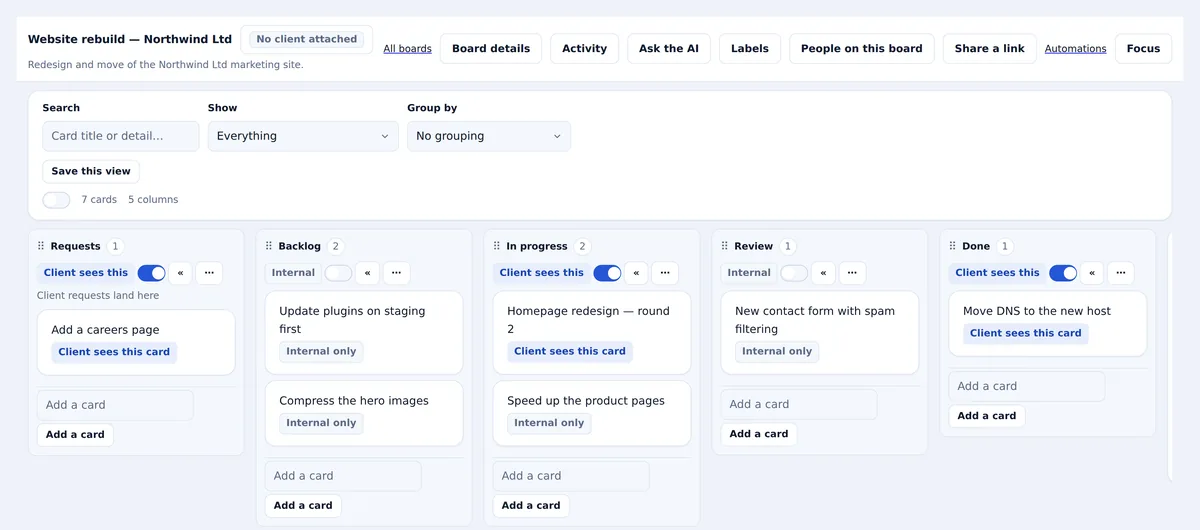
Every other project tool makes you choose between a board your team can work on and a board your client is allowed to see. Zinn® Boards is one board with a visibility switch on every column, card and comment. Your notes, your blockers and your internal estimates stay yours; the client sees the stages, the work that is theirs to know about, and the questions you have asked them.

That is the whole design, and it is why sharing is safe. A client link cannot show a client something you have not marked client-visible — the filtering happens in the database query, not in the interface, so there is no toggle anybody can get wrong at five to six on a Friday.
Cards moving between the stages of a project board, with a shared link going out to a client

What you get

Everything below is included in every paid tier. The free tier gives you one board to try it on.

Share by link, no email

Generate a copy-paste link and put it wherever your client already talks to you — WhatsApp, Slack, a message, an email you write yourself. We send nothing. A read-only link needs no account at all: they click, and the board opens.

Links you can take back

Every link expires, you can cap how many people may use it, and revoking one also removes anybody who joined through it. A link that went to the wrong channel is one click to undo.

Client-visible by choice

Columns, cards and comments each carry their own visibility. Mark a stage client-visible and they follow progress through it; leave a card internal and it does not exist as far as they are concerned.

Questions and requests, in one place

Ask the client a question against the card it belongs to and it waits for them on their board. Give them one intake column and they can raise a request without an email thread nobody can find later.

Labels, archiving and a full history

Label the way your team files work, and archive a board when the project ends rather than deleting it — the questions, the answers and the record of what was delivered stay readable. An archived board stops counting against your limit, so keeping your records costs you nothing.

AI that drafts, summarises and tidies

Turn a rambling client message into a card with a title and a body. Summarise a week of progress into something you can send. Ask what is stuck and why.

Every change, attributed

Who moved it, who commented, who answered, and when. The board keeps its own activity trail, and your client sees only the part of it that was theirs to see — so a question about what happened has an answer neither side has to remember.

Full API and MCP

Every board, card, comment and share link is drivable from our public API and from our MCP server — so an AI agent can read a board, add the work, move it and send the client a link, in one instruction.

How it works

Three steps, and the third one is the point.

  1. Make a board

    Name it, point it at a client if it is theirs, and it arrives with a working pipeline. Rename the stages or keep ours.

  2. Do the work

    Cards, comments, checklists, due dates, labels. Mark what the client should see as you go, or leave everything internal and decide later.

  3. Send them a link

    One click makes a link. Paste it wherever they are. They open it and see exactly the board you meant them to see, on your branding, with no signup in the way.

Pricing

Flat monthly pricing per organisation. There is no per-seat charge and there never will be — inviting a client should not cost you anything, because inviting clients is the point.

Zinn® Boards Free

$0.00/month

Zinn® Boards Pro

$9.00/month

Zinn® Boards Business

$29.00/month

Every Agency hosting plan already includes boards — 10 on Agency Start, 50 on Growth, unlimited on Scale — along with the API and MCP access. If you host with us, you may not need to buy this at all.

Why we built it this way

We host for agencies, and the same thing came up every time: the client wants to know where the work is, the agency does not want to show them everything, and the compromise is a weekly email somebody has to write. A board with per-item visibility removes the email without exposing the workshop.

The invite link is the other half. Every tool that makes a client register an account before they can look at a picture of some cards is a tool the client stops opening. So the default link needs no account, grants read and nothing else, expires, and can be revoked along with anyone who used it.

Does the person I send a link to need a Zinn® account?

Not for a read-only link — they click it and the board opens, with no signup and no sign-in. They need a free account only to write: to comment, answer a question, move a card or raise a request. That takes one screen and the board is waiting on the other side.

What can somebody with a link actually see?

Exactly what your client sees in their own console, and nothing more. Internal columns, internal cards and internal comments are excluded by the database query that builds the page, so a link cannot leak something you did not mark client-visible.

What happens if I paste a link in the wrong place?

Revoke it. That kills the link and removes anybody who already joined the board through it, and it tells you how many people that was. Expiry is different on purpose: when a link simply ages out, people who already joined keep the board.

Can I limit a link to one person?

Yes — set it to single use and it stops working once somebody joins. You can also cap it at any number, and choose how long it lasts, up to three months. There is deliberately no never-expires option.

Will my client see Zinn® branding?

Not if you are on a plan with white-label branding. The shared board carries your name, your logo and your colour, and if a client does need to sign in they are sent to your own branded login rather than ours.

Can I drive a board from code, or from an AI assistant?

Yes. Every operation is in our public OpenAPI specification, with a generated TypeScript client, and there is an MCP server so an AI assistant can list boards, add and move cards, comment and create share links. It is included in Boards Business and in every Agency hosting plan.

Does this replace Trello or Jira?

For client-facing project work, yes — that is what it is for, and the per-item visibility and the no-account share link are things neither of those does. For a large internal engineering backlog it is not trying to be Jira, which is why the GitHub Projects sync exists instead.

What happens to a board when a project ends?

Archive it. The board, its history and every question and answer stay readable, and an archived board does not count against your board limit — so keeping your records costs you nothing.

Start with one board, free

No card, no trial clock. Make a board, do a week of real work on it, and send your client a link.

Start free