Availability, from more than one place
We request the page on a schedule and record whether it answered. A single failed check from a single location is not an outage, so we confirm from another vantage point before we tell you anything.
Uptime & performance monitoring
We watch any web address you give us — hosted with us or anywhere else — and check from more than one place on the internet that it is still answering. When it stops, you hear about it in minutes, on the channel you already read. Three addresses are free on every account, with no hosting and no plan required.
Most uptime monitoring is sold as a feature of something else — a line item on a hosting plan you already pay for, watching only the sites that sit on it. This is not that. You give us a web address and we watch it, whether it runs on our fleet, on a competitor's, on a server in your own office, or on a platform you do not control at all.
That matters because the sites you most need to hear about are often the ones you inherited: a client's old shop on somebody else's hosting, a landing page a marketing agency put up, an API your business depends on and nobody owns. You should not have to move a site to us in order to find out when it breaks.
Every monitor covers availability and speed together, because a site that answers slowly is on its way to not answering at all.
We request the page on a schedule and record whether it answered. A single failed check from a single location is not an outage, so we confirm from another vantage point before we tell you anything.
We measure how long the page actually takes to become useful to a visitor, not just how fast the server returned a byte. You can see a site getting slower over weeks, before customers start complaining.
Email, Telegram, Slack or your own webhook endpoint. Webhook deliveries are signed with an HMAC over a timestamp and the body, so your endpoint can verify they came from us, and a delivery that fails is recorded on your account.
You are told when an address comes back as well as when it goes down. An alert with no all-clear leaves somebody refreshing a browser tab to find out whether the problem is over.
Hour-by-hour uptime and response times, and every outage with how long it lasted, are kept for as long as you watch the address — so you can answer 'was it down on Tuesday' with a record rather than a memory. Useful when a client asks, and useful when a supplier says it was fine.
Monitors can be created, listed, paused and removed over our REST API, so your own dashboard or scripts can read their state. Access uses an API key scoped to your organisation, and each key can be revoked.
This is the screen you use, captured from the live dashboard rather than drawn for this page.
Paste a web address, give it a name if you like, and add a word that must appear on the page — so a site that answers with an empty page still counts as down. Your free allowance is shown above it, so you always know how many addresses you have left.
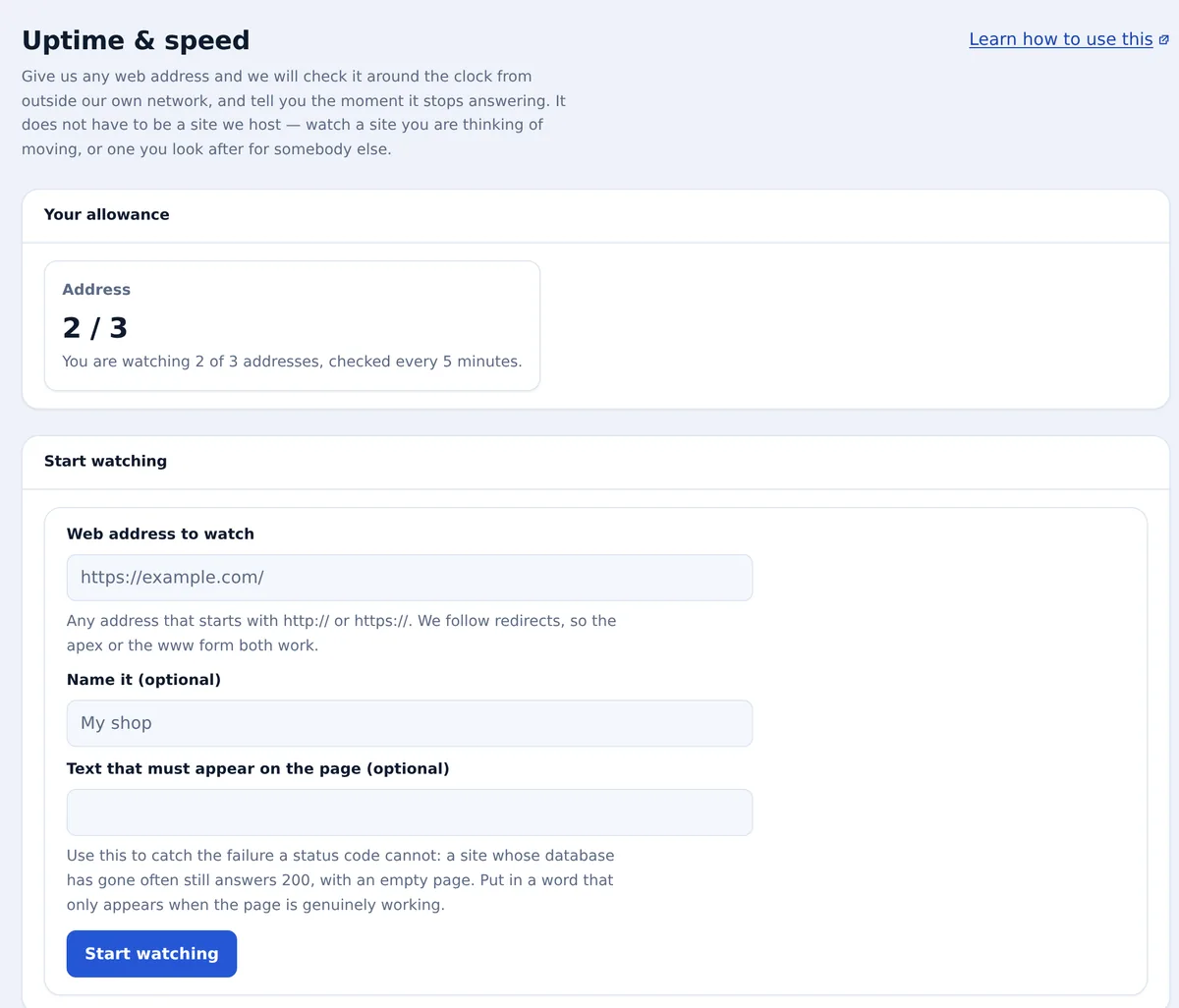
There is nothing to install on the site being watched. It does not need to be a WordPress site, and it does not need to be ours.
Paste in any public URL. No agent, no plugin, no DNS change and no access to the server it runs on.
Requests go out from outside our hosting network on a fixed cadence, and a failed check is repeated at once with a fresh request, usually from a different location, before it counts.
Connect the channels each person wants — Telegram on the on-call engineer's phone, a Slack room for the team, a webhook for your own systems.
Three addresses are free on every account, forever, with no hosting plan and no card. Beyond that you buy addresses in packs, and the packs stack — if you need thirty, that is three packs, not a bigger tier with things you did not ask for.
Free
Three monitored addresses on any account, checked on the standard cadence. No plan required and no card.
$9.00/month
Paid addresses are checked more often than free ones, so you hear about a problem sooner. Packs stack, and you can add or remove them whenever you like.
Because we are the ones who get woken up. Every technique here — checking from several places before believing a failure, watching load time as an early warning rather than waiting for a hard down, sending the all-clear as well as the alarm — comes from running a fleet of our own and learning which alerts are worth a person's attention at three in the morning.
And because the monitoring is not the point. If an address you watch is one of ours, the same signals are already wired to the people who can fix it, and to the diagnostics that run before you have finished writing a support ticket. If it is not one of ours, you still get the alert, and you still get to decide what to do about it.
How outages are confirmed before you are alerted, step-by-step guides, free domain expiry monitoring, and fair comparisons with UptimeRobot, Pingdom and StatusCake.
No. You need an account, which is free, and that is all. The three free monitors work with no hosting plan attached, and the paid packs are bought on their own. Plenty of people use this to watch sites that run somewhere else entirely.
Within minutes. A failed check is confirmed from a second location before we alert you, which costs a little time and removes almost all the false alarms — an alert you have learned to ignore is worse than no alert. Paid addresses are checked more frequently than free ones, so they detect a problem sooner.
Any address that answers a public HTTP request: a website, a landing page, a login screen, an API endpoint, a status page. It does not need to be WordPress, it does not need to be on our infrastructure, and we do not need any access to the server behind it.
Through whichever channels you connect — email, Telegram, Slack, or your own webhook. Preferences are set per organisation and per person, so the on-call engineer's phone and the team's chat room do not have to receive the same things. Webhook deliveries are signed, and a delivery that fails is recorded on your account. SMS and phone calls are not offered.
You buy a pack of additional addresses, and packs stack — thirty addresses is simply three packs. There is no upgrade cliff where you have to move to a bigger plan to get a higher number, and no bundle of features you did not want attached to the count you did.
No, and they answer different questions. This tells you about your addresses. Our status page tells you about our platform, and it is deliberately hosted off our own infrastructure in a separate failure domain — a status page running on the thing it reports on is useless at exactly the moment you need it.
Step-by-step guides from our knowledge base, written for exactly this.
Give your visitors one page that shows whether your site is up, with your logo, favicon and colours, at our address or at your own such as status.yoursite.com.
Read the guide →Add a backup every hour to a website for $1.50 a month. The last 48 hours are kept, on top of the nightly backups.
Read the guide →One add-on gives every Footprint-Free site on your account more CPU and memory than its plan, including sites you add later.
Read the guide →Create an account, paste in the URLs you would hate to find broken, and choose where the alerts should go. No hosting plan, no card, and nothing to install on the sites you are watching.
Start free