ownCloud hosting

ownCloud hosting, installed in one click

14 days free. No card, and nothing is charged unless you choose a plan.
Plans from $2.99 a month

Install ownCloud from your dashboard with its database set up for it, on a managed Linux platform with free SSL, daily backups and a global CDN on every site.

  • Card
  • Apple Pay
  • Google Pay
  • PayPal
  • Crypto
Zinn®, our Viking, carrying an app into a cabinet of apps whose lights come on.
  • 700,000+websites hosted on our platforms worldwide
  • 58languages, dashboard and support alike — five of them right to left
  • 29applications you can install in one click, kept up to date for you
  • 100%renewable electricity in every one of our data centres — verifiable, not offset

About ownCloud

ownCloud is self-hosted file sync and share — the original of the two open-source projects — with desktop and mobile clients that keep a folder in step across all your devices and a web interface for sharing with others.

A database is created for it automatically.

ownCloud documentation

Why people choose ownCloud

Organisations already standardised on ownCloud clients and integrations keep using it for the same reason they chose it: their files stay on hosting they control. It arrives installed, connected to its database and ready to sign in to.

What we install for ownCloud, and how

  • ownCloud Server is downloaded from the project's official releases, found through GitHub, at install time and set up with occ, ownCloud's own command-line tool.
  • The data directory that holds every synced file is created in your account's home directory, outside the web root, so files cannot be fetched by guessing a URL.
  • A MariaDB database is created and connected for ownCloud's file cache, shares and users, and your domain is set as a trusted domain so clients connect straight away.
  • You sign in at the site root with the administrator account the installer created; your dashboard reveals its password on request and logs every reveal.

What our hosting does for ownCloud

  • Scheduled tasks are included, so ownCloud's background jobs run on a timer rather than waiting for someone to visit the page.
  • You choose the PHP version and can change its settings, and SSH access is included for the occ command-line tool used for upgrades and maintenance.
  • Daily backups and free SSL come with the plan, so synced files are copied every day and every connection from the clients is encrypted.

Tuned for the app, not generic hosting

A server set up for ownCloud from the first request

ownCloud is installed on a server profile made for ownCloud: the PHP version, memory, extensions, compiled-code cache and scheduled tasks it needs are applied when your site is built — not one generic setup shared by every app.

PHP version
PHP 8.4
Memory per request
512 MB, rising with your plan up to 2048 MB
Largest upload
Up to 4096 MB
Compiled-code cache
128 MB, 32531 files
Form fields per request
5000
PHP extensions
21 switched on for ownCloud
Scheduled tasks
Every 15 minutes
PHP hardening
Risky PHP functions locked down, with only what ownCloud needs allowed
Search engines
Kept out: every response is marked noindex
Browser caching
Scripts, styles and fonts for a year; images for 30 days
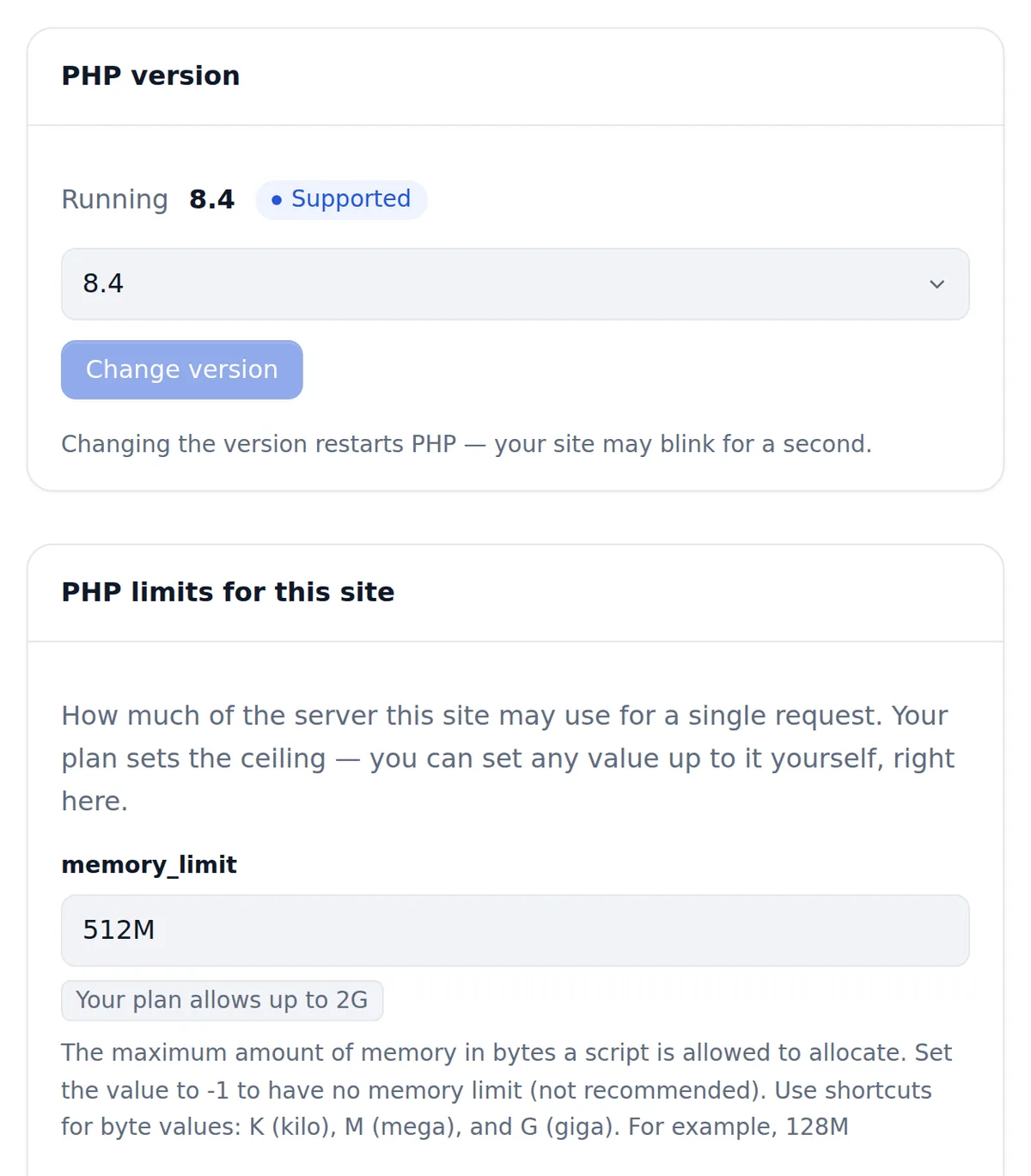
The dashboard's Software tab for one site: PHP version 8.4 selected and marked supported, and the PHP limits card showing memory_limit set to 512M with the plan allowing up to 2G.

Backed up and protected every day

The same care runs under every ownCloud site, with nothing to switch on.

  • Daily backups, kept 30 days
  • A malware scan every day, malware found cleaned automatically, and one-click restore from your dashboard
  • A website firewall: your own rules on top of platform protection that cannot be switched off
  • Security headers on every response: HTTPS-only (HSTS), no MIME sniffing, no framing by other sites
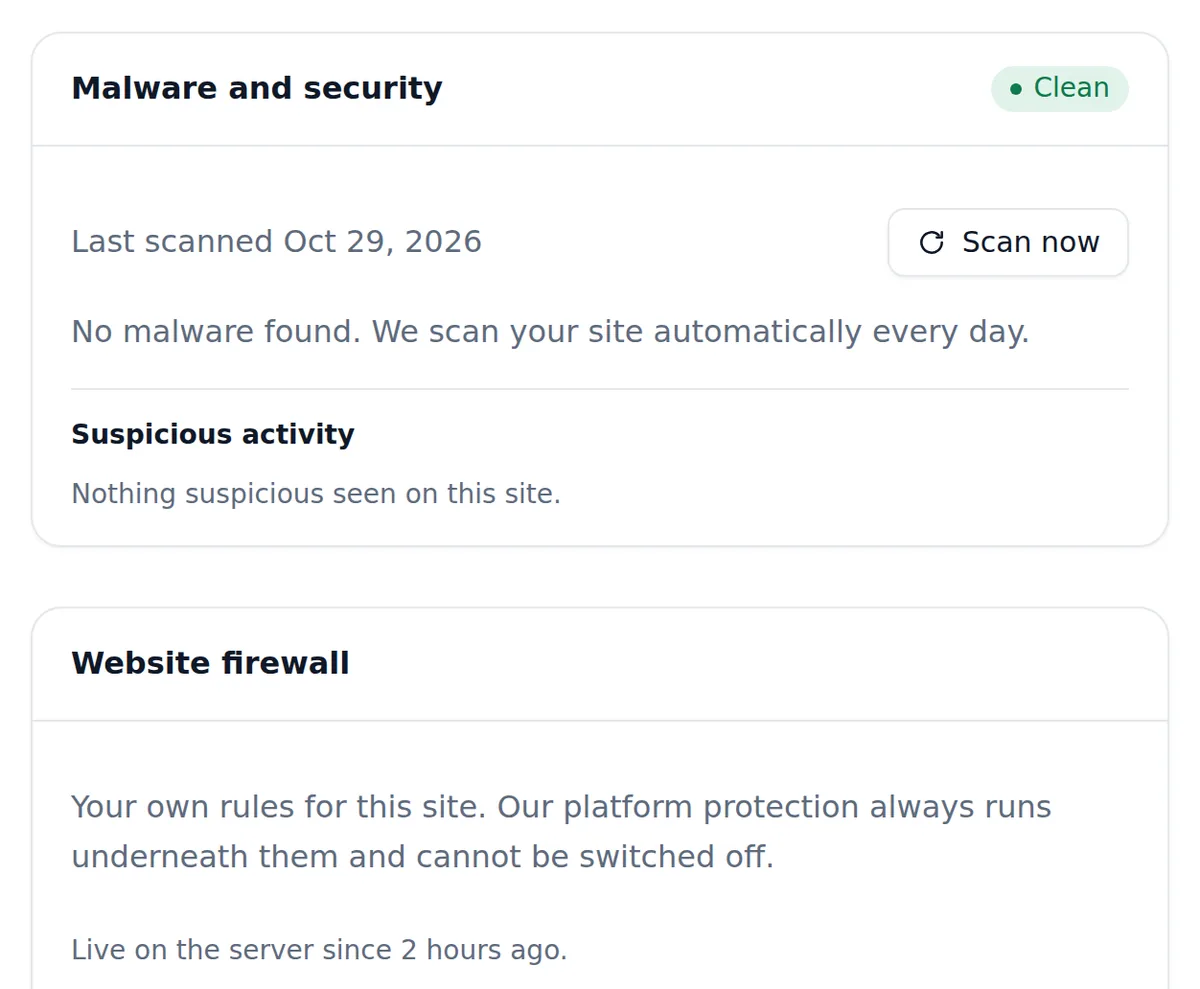
The dashboard's Security tab for one site: the malware scan marked Clean with today's scan date and a Scan now button, and the Website firewall card noting platform protection always runs underneath.

Automatic ownCloud updates

We upgrade ownCloud for you in a time window you choose, after trying each update on a test copy of your site. Every update is backed up first and rolled back automatically if anything fails.

$50.00 a year per site

Plans and pricing

ownCloud runs on our Linux hosting. One plan, everything included.

Linux Basic

$2.99/month

$29.90/year2 months free

or $29.90 a year2 months free

Websites
1
NVMe storage
1 GB
Bandwidth
Unlimited*
MySQL databases
2
Database size
400 MB per site
Mailboxes per domain
Unlimited*
14 days free. No card, and nothing is charged unless you choose a plan.

Linux Pro

$14.99/month

$149.90/year2 months free

or $149.90 a year2 months free

Websites
1
NVMe storage
25 GB
Bandwidth
Unlimited*
MySQL databases
Unlimited*
Database size
400 MB per site
Mailboxes per domain
Unlimited*
14 days free. No card, and nothing is charged unless you choose a plan.

Storage upgrades available on all plans: add 10 GB, 50 GB or 100 GB to any website, whenever it needs more. Extra storage

  • Try it firstEvery managed plan starts with a free trial of 14 days, so you can put a real site on it before you pay for anything.
  • 30-day money-back guaranteeIf a managed plan is not right for you, tell us within 30 days of your first payment and we refund it. Application hosting is covered. Read the refund policy
  • Real support, included24/7 expert support is included on every plan, from people who run this platform rather than a script. How support works
  • Our own custom control panelBuilt in-house for hosting customers: every site, server, domain and mailbox in one fast, secure panel, instead of a stock control panel.

What you pay when the first term ends

Cheap hosting is usually cheap once. The industry sells a low first term paid years in advance and then renews at several times the price you signed up at. We do not do that, and here is the arithmetic beside three hosts that do.

HostWhat you pay up front for the advertised priceWhat the price does on renewal
Zinn Digital®Nothing — pay monthly, or pay for a year up front and save. Every plan shows both prices before you buy.Nothing. The price you see is the price you renew at
SiteGround12 months, in advanceMultiplies by 5.3
Hostinger48 months, in advanceMultiplies by 3.6
Bluehost36 months, in advanceMultiplies by 2.5

Read from each host's own pricing page on 2026-09-08. Their prices are theirs and they change; the multiple is the renewal price they publish divided by the price they advertise beside it.

Everything included

Generated from the hosting platform's own capability record, so it describes what the plan grants today.

Built for speed

  • Anycast CDN caching on every site
  • Automatic image and asset optimisation at the edge
  • Edge cache and traffic statistics
  • Switch PHP version whenever you need to
  • Full control of PHP settings and extensions

Security, on by default

  • Free SSL certificate on every domain
  • SSL issued and renewed automatically
  • Force HTTPS across the whole site
  • Daily malware scanning
  • Malware findings reported in your dashboard
  • Security headers applied at the edge
  • Password-protect any directory
  • Block visitors by IP or country
  • Hotlink protection for your images and files

For developers

  • SSH and SFTP access
  • Deploy from Git
  • FTP access
  • phpMyAdmin for direct database access
  • Scheduled tasks (cron jobs)
  • Browser-based file manager
  • Set file and directory permissions
  • Maintenance mode while you work

Backups and recovery

  • Daily backups
  • Timeline backups — restore a site to a point in time
  • Timeline Backups Pro, with a longer history and finer restore points

Applications

  • Application manager for one-click installs and updates
  • Every application we add in future, included
  • Reinstall the platform from scratch whenever you want

Business email included

  • Mailboxes
  • Mailbox size: 10 GB
  • Mail forwarders: Unlimited
  • Auto-responders: Unlimited
  • Webmail, with contacts, filters and out-of-office replies
  • IMAP sync from your old provider
  • DKIM signing configured for you
  • Guided DMARC setup
  • Spam and virus filtering on every mailbox

Know what your site is doing

  • Bandwidth usage, per site
  • Disk usage, per site
  • Access and error logs you can read yourself
  • Automatic diagnostics when something looks wrong
  • Usage against your allowance, always visible

Where your site lives

Choose the data centre your site lives in: Flag of FinlandFlag of the European UnionHelsinki, Finland (European Union), Flag of SingaporeSingapore, Flag of United StatesAshburn, eastern United States, and Flag of United StatesHillsboro, western United States.

  • Flag of FinlandFlag of the European UnionHelsinki, Finland (European Union)
  • Flag of SingaporeSingapore
  • Flag of United StatesAshburn, eastern United States
  • Flag of United StatesHillsboro, western United States

Renewable power, in every location we host

Our servers run on renewable electricity in every location we host — Europe, the United States and Singapore alike — sourced that way, not offset after the fact.

  • Renewable electricity in every one of our data centres
  • Data centres running at a PUE of 1.1 to 1.2
  • Sites on our shared platform pass the Green Web Foundation's checks — a third party you can verify for yourself

Read how we run the platform

Questions people ask before they buy

Why would I choose ownCloud rather than Nextcloud?

Both started from the same code. Choose ownCloud if your team already uses ownCloud desktop and mobile clients, scripts written against ownCloud's server APIs, or ownCloud-specific apps, and you want to keep them. If you are starting fresh, compare the two projects' app catalogues; both are one-click installs here and run on the same hosting.

How do the ownCloud clients connect?

Install the ownCloud desktop or mobile app, enter your domain as the server address and sign in. Your domain is already a trusted domain, and the free SSL certificate we issue and renew encrypts every connection. Create a user for each person rather than sharing the administrator account.

Where does ownCloud store my files?

In a data directory in your account's home, outside the public web root, on the same hosting as the application. Daily backups copy the data directory and the database every day, so a deleted folder or an overwritten document is recoverable.

Which ownCloud version do you install?

The newest stable ownCloud Server release published when you install. Upgrades are run over SSH with occ upgrade after the new files are in place; check that the apps you rely on are marked compatible before upgrading.

Do ownCloud background jobs run?

Yes. Scheduled tasks are included, so switch ownCloud's background jobs to Cron in its admin settings and schedule them. Clean-up, file scanning and notifications then run on a timer, rather than when someone visits the web interface.

Can you migrate an existing ownCloud server?

Yes, free on any paid plan. AI Move copies the program files, the data directory and the database, updates config.php and runs a file scan so ownCloud's index matches the files. Users and shares come with it, and the clients reconnect once your domain points here.

Can I manage ownCloud with occ?

Yes. SSH is included, so occ is available for user management, maintenance mode, file scans and upgrades. You also choose the PHP version per site and can change its settings, which large uploads sometimes need.

Should I install ownCloud or Nextcloud?

If your organisation already runs ownCloud clients, integrations or custom apps, ownCloud keeps them working. Nextcloud has the larger app ecosystem for calendars, chat and office. Both store files outside the web root on your own hosting and both are one-click installs here, so you can try each on a subdomain.

What should I do after installing ownCloud?

Switch background jobs to Cron, create users and groups, set quotas and configure email so share notifications go out. Enable only the apps you need, then connect desktop and mobile clients with app passwords rather than the main password.

How do I keep ownCloud secure?

Keep ownCloud and its apps updated, enable two-factor authentication, and use app passwords for every client. Data stays outside the web root, all traffic is HTTPS, and daily backups kept for 30 days, a daily malware scan and a website firewall run underneath.

How do I back up ownCloud myself?

Put ownCloud into maintenance mode with occ, copy the data directory and config folder, dump the database, then leave maintenance mode. The hosting also keeps daily backups for 30 days with one-click restore, covering files and database together.

Which ownCloud apps are commonly enabled?

Calendar and Contacts, two-factor TOTP, password policy, activity and the files-sharing extensions are typical. ownCloud's marketplace lists more; enable only what your users need, and check compatibility with your server version first.

Is the server tuned for ownCloud?

Yes. When your ownCloud site is built, the server applies a profile made for ownCloud: PHP 8.4, 512 MB of memory per request rising with your plan, a 128 MB compiled-code cache and 21 PHP extensions, plus security headers and long browser caching for its files. Daily backups kept 30 days, a daily malware scan and a website firewall run underneath.
Questions before you buy or about a product? Message us on Telegram at @zinndigital. Telegram is for pre-sales and product questions only, and our CEO answers it personally when he is awake. Support is by ticket, answered 24/7.

Browse all 29 applications

Start today, and keep the price you started at

Every shared plan begins with a free trial and is covered by a 30-day money-back guarantee, and the price you sign up at is the price you renew at. If you would rather ask somebody first, the people who answer are the people who run the platform.

Get started Talk to us