
Zinn® Ads
Count what your ads bring in, without touching your theme
Zinn® Ads tracks purchases, trials, checkouts and form leads on WordPress with no code, asks for consent the way Google Consent Mode v2 expects, and checks paid clicks for fraud.
Built for speed and SEO. Zinn® Ads adds +3.7 kB and 0 third-party requests to a page. Measured, not claimed. See the numbers →
Built for speed and SEO
Page speed affects where Google ranks a page and how many visitors stay on it. So instead of telling you Zinn® Ads is light, we installed it on a clean WordPress test site and measured what it adds to a page.
- +3.7 kBadded to the page: everything a visitor's browser downloads
- 0requests to other companies' servers
- 100 → 100Lighthouse performance score on phones, without the plugin → with it
- 91 → 91Lighthouse SEO score, without the plugin → with it
Measured on 2026-11-01: Zinn Ads 1.0.0 on a clean WordPress test site, using Lighthouse's test for phones, run 5 times and taking the middle result. Page weight counts everything a visitor's browser downloads within 15 seconds, including after a scroll. Every result, and how we measured it
Why people choose Zinn® Ads
No code to paste
Purchases, checkouts, cart adds and form leads are read from WordPress itself, so a theme change never breaks your tracking.
Consent first
Ad cookies stay off until the visitor allows them, through our banner or your WP Consent API plugin.
Fraud checks on paid clicks
Visits from an ad are checked by the Zinn® Ads click shield, which flags bots and repeat clickers.
What Zinn® Ads does
Zinn® Ads connects a WordPress site to your Zinn® Ads account. Paste a connection code from your Zinn® dashboard and the plugin starts counting what your ads bring in: WooCommerce and Easy Digital Downloads purchases, free trials, checkouts started, products added to the cart, product views, and form leads from Contact Form 7, WPForms, Gravity Forms and Fluent Forms. It works with the classic checkout and with the block checkout WooCommerce uses by default. A small cookie banner sets Google Consent Mode v2, so ad cookies stay off until the visitor allows them; if a consent plugin that uses the WP Consent API is active, Zinn® Ads follows its answer instead. Visits that arrive from a paid click are checked by the Zinn® Ads click shield, which flags bots and repeat clickers.
Why it matters
Conversion tracking usually means pasting tags into a theme and hoping a theme update does not remove them. Zinn® Ads reads the order, the form and the checkout from WordPress itself, sends each purchase once, and records money in the currency's own minor units, so a sale of 19.99 is never counted as 19.98. The ad click id is kept in a first-party cookie only after consent and saved on the WooCommerce order, so a sale made days later can still be credited to the click. On a site behind Cloudflare you can run the tags in Cloudflare Zaraz instead, with no tag in the visitor's browser.
What is in it
Everything Zinn® Ads does, listed from the plugin itself, so this page changes when the plugin does.
Conversion tracking
- Store purchases, once per orderWooCommerce and Easy Digital Downloads orders are counted on their thank-you page, once, with the value in the currency's own minor units.
- Classic and block checkoutAdded to cart and purchases are counted on the classic checkout and on the block checkout WooCommerce uses by default.
- Form leadsContact Form 7, WPForms, Gravity Forms and Fluent Forms submissions count as leads, with no form changes.
- Click ids on the orderAfter consent, the ad click id is kept in a first-party cookie and saved on the WooCommerce order, so a later sale is credited to its click.
- Cloudflare Zaraz modeOn a site behind Cloudflare the tags can run in Zaraz, with no tag in the visitor's browser, and your dashboard compares what was sent with what Google counted.
Consent
- Google Consent Mode v2Consent defaults are set to denied before any tag loads, and updated the moment the visitor chooses.
- A small cookie bannerA light banner that asks once and remembers the answer; switch it off if you use another consent tool.
- Works with your consent pluginWhen a consent plugin that uses the WP Consent API is active, Zinn® Ads follows its marketing answer and shows no banner of its own.
Click fraud
- Click shieldA visit from a paid click, and the same visitor's next ten minutes, are sent in batches to the Zinn® Ads click shield to flag bots and repeat clickers.
- Disconnect for realDisconnecting revokes the site's token at once and deletes the visits the plugin was holding.
What you are downloading
The facts about the file, the requirements and how to install it.
- Version
- 1.0.1
- Minimum WordPress
- WordPress 6.6
- Minimum PHP
- PHP 8.2
- Tested up to
- WordPress 7.1
- Download size
- 568 KB
- Released
- Licence
- GNU General Public License, version 2 or later
- Written by
- Neil Lock — CEO, Zinn Digital® Ltd
Check the download is genuine (SHA-256)
Checking the file is ours
This is code that will run on your site, so you should be able to prove the file you downloaded is the file we published. Run the command for your computer against the zip and compare the result with the checksum below — they must match exactly, character for character.
- SHA-256
31012c6d3f2fc252e245eac212168a7c27b3251f87261751d7271ec75d6f2dfd- On Linux
sha256sum zinn-ads-1.0.1.zip- On macOS
shasum -a 256 zinn-ads-1.0.1.zip- On Windows
certutil -hashfile zinn-ads-1.0.1.zip SHA256
The download itself also returns the same value in an X-Zinn-Package-SHA256 header, so an automated deployment can check it without reading this page.
What Zinn® Ads needs
WordPress 6.6 or later and PHP 8.2 or later. A Zinn® Ads account, where you make the connection code. WooCommerce, Easy Digital Downloads and the form plugins are optional: the plugin tracks the ones that are active. Click-fraud checks need the click shield on your Zinn® Ads plan, or the click shield add-on; sites hosted by Zinn Digital® have it included.
How you get Zinn® Ads
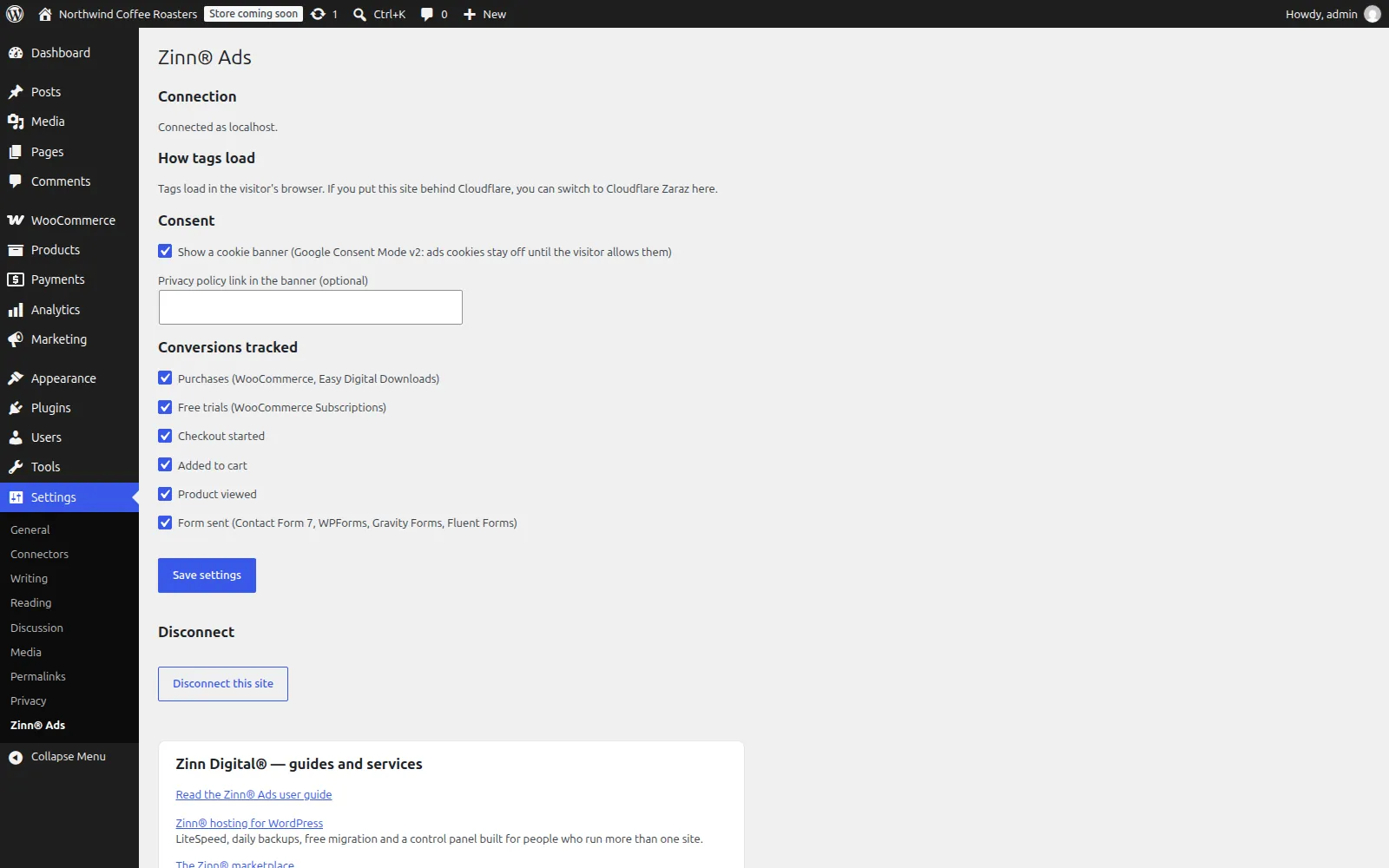
Install and activate the plugin. In your Zinn® dashboard open Ads, WordPress sites, and make a connection code. In WordPress open Settings → Zinn® Ads, paste the code and press Connect. Choose which events to count, and whether to show the cookie banner.
Installing it
Download the zip
Use the download button above. Keep the file as it is — do not unzip it, because WordPress expects the archive itself.
Open Plugins → Add New Plugin in wp-admin
Sign in to your site's wp-admin, open Plugins in the left-hand menu, then Add New Plugin at the top of the page.
Upload and install
Choose Upload Plugin, select the zip you just downloaded, then Install Now. WordPress unpacks it for you.
Activate it
Choose Activate Plugin when the upload finishes. The plugin's own settings then appear in wp-admin — nothing else is required to start using it.
Built to WordPress.org plugin-directory standards: the WordPress Coding Standards, a security review, no PHP notices, and translation-ready in every language we sell in.
Questions about Zinn® Ads
Do I need a Zinn® Ads account?
Yes. The plugin connects a site to your Zinn® Ads account with a code you make in your Zinn® dashboard under Ads, WordPress sites. Without a connection it adds nothing to your pages.
Does it work with the WooCommerce block checkout?
Yes. Products added to the cart and completed purchases are counted on the block checkout and the classic checkout alike, and each order is counted only once.
Does it set cookies before the visitor agrees?
No. Google Consent Mode v2 defaults are set to denied before any tag loads, and the click id cookie is written only after the visitor allows ad cookies.
What does the click-fraud check need?
The click shield on your Zinn® Ads plan or the click shield add-on; sites hosted by Zinn Digital® have it included. Without it the plugin still tracks conversions and stops sending visits.
Updates
On a site we host, these plugins are configured to update themselves: they check with us and WordPress installs the new version for you, with the download verified against its published checksum first. On a WordPress we do not host, there is nothing to configure and nothing phones home — come back to this page when you want the newest version, or watch the plugin's GitHub releases.
Need an older version?
Customers can download the newest release of each of the two previous major versions of every plugin in the Zinn Digital® app. It is there for a site that cannot run the current version yet — one still on an older WordPress or PHP — and for rolling back an update that caused a problem. When you can, install the current version.
Get Zinn® Ads working on a real site
Zinn® Ads runs on any WordPress site, wherever it is hosted. Every WordPress site we host also comes with our free plugins already installed.