Free
$0.00
Every free feature on this page, on as many sites as you like.
- Unlimited sites

Zinn® Cache Pro
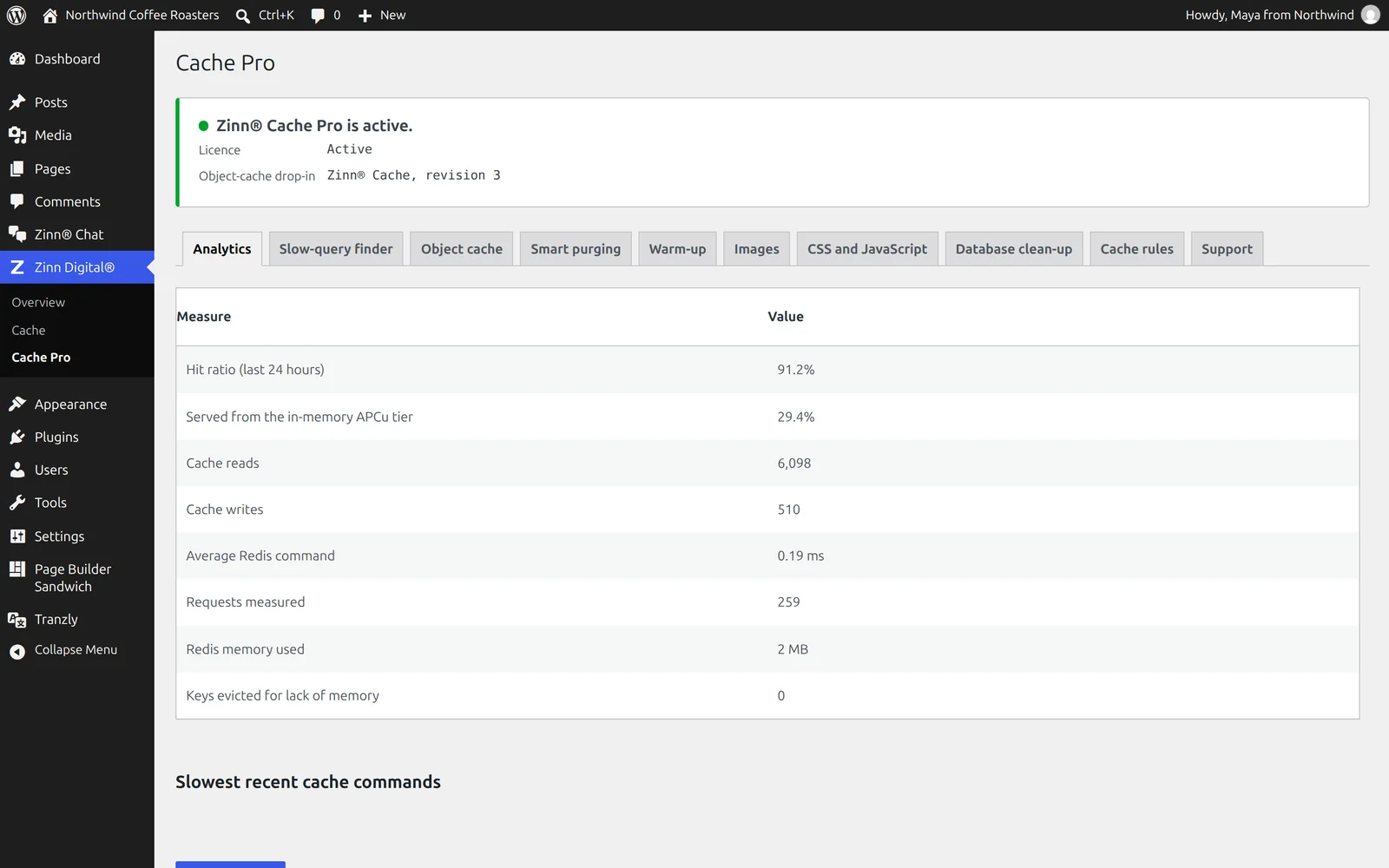
Zinn® Cache Pro adds to the free Zinn® Cache plugin: analytics that show whether the cache is really working, a finder that names the plugin behind each slow query, a faster object cache, warm-up and lighter pages.
Built for speed and SEO. Zinn® Cache Pro adds 0 kB and 0 third-party requests to a page. Measured, not claimed. See the numbers →
Zinn® Cache Pro is an optional paid upgrade, from $49.00 a year, with a 14-day free trial. Zinn® hosting includes the free Zinn® Cache; this Pro edition is bought separately, for sites hosted with us or anywhere else. Already had a free trial? Buy now →
Hosting customer? Get 50% off your first payment of Zinn® Cache Pro. Get your code in the dashboard →
Page speed affects where Google ranks a page and how many visitors stay on it. So instead of telling you Zinn® Cache Pro is light, we installed it on a clean WordPress test site and measured what it adds to a page.
On the same test page, W3 Total Cache added +0.5 kB and 0 requests to other companies' servers. Zinn® Cache Pro added 0 kB and 0.
Measured on 2026-10-01: Zinn Cache 1.8.2 on a clean WordPress test site, using Lighthouse's test for phones, run 5 times and taking the middle result. Page weight counts everything a visitor's browser downloads within 15 seconds, including after a scroll. Every result, and how we measured it · Compare with other plugins
Hit ratio, memory, evicted keys and the slowest Redis commands on one screen, so a cache that is quietly failing stops looking the same as one that works.
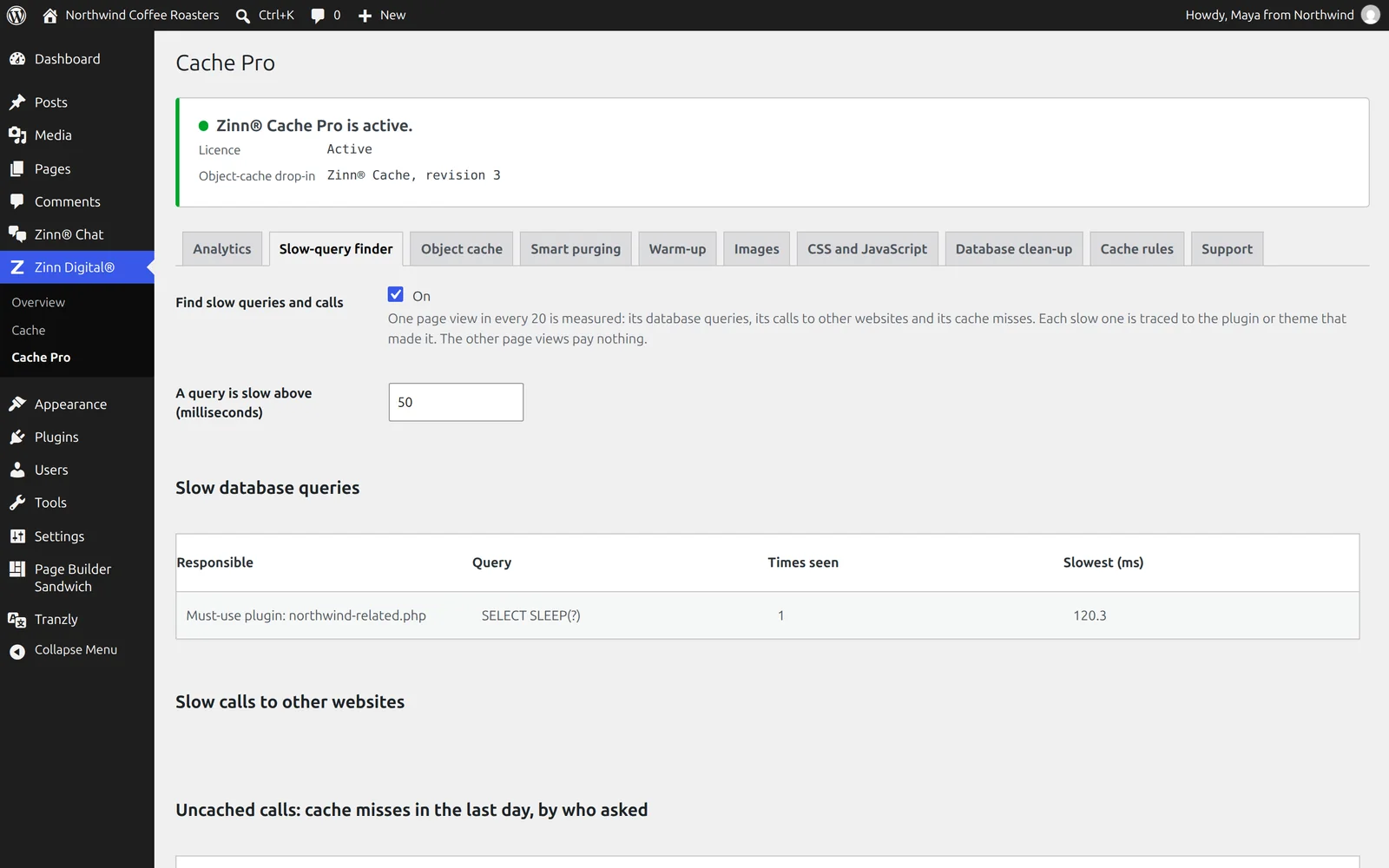
A sample of real page views is measured and every slow query, slow outside call and cache miss is traced to the plugin or theme behind it.
WebP and AVIF images, unused-CSS removal, delayed JavaScript, warm-up and database clean-up in one add-on, with safe defaults for checkout and consent tools.
Which of the two plugins you need, a benchmark measured on a real site, step-by-step guides from installing to clearing the cache and turning on Redis, and fair comparisons with WP Rocket, LiteSpeed Cache, W3 Total Cache and WP Super Cache.
Zinn® Cache Pro installs on top of the free Zinn® Cache plugin and adds what a busy site needs to find and remove what is slowing it down: cache analytics, a slow-query and uncached-call finder, a faster object cache, smarter purging, warm-up, and image, CSS and JavaScript optimisation. It is sold as an annual licence through Freemius, for one site, five sites or unlimited sites, with a free trial and no card needed.
A cache that works is not the same as a cache that is working well. A plugin that bypasses the cache on every page view, a slow query in a theme, or Redis quietly running out of memory all look the same from the outside: a slow site. Zinn® Cache Pro measures a sample of real page views, names the plugin or theme responsible, and then makes each cached read cheaper.
8 free features and 13 more in Pro, listed from the plugin itself, so this page changes when the plugin does.
Everything in the free plugin stays free. Pro adds the rest, on top of it.
| FreeFree forever | ProFrom $49.00 a year | |
|---|---|---|
| Page cache | ||
| Full-page cache on any server | Yes | Yes |
| Safe exclusions for shops | Yes | Yes |
| Object cache | ||
| Redis object cache that proves it works | Yes | Yes |
| Works with your host's cache | Yes | Yes |
| An in-memory tier in front of Redis | No | Yes |
| More data in the same memory | No | Yes |
| Prefetching | No | Yes |
| Purging and warm-up | ||
| Purges only what changed | Yes | Yes |
| Purge from your own scripts | Yes | Yes |
| Smarter purging for WooCommerce | No | Yes |
| Cache warm-up | No | Yes |
| Works with Zinn® SEO | Yes | Yes |
| Lighter pages | ||
| WebP and AVIF images | No | Yes |
| Remove unused CSS | No | Yes |
| Delay JavaScript | No | Yes |
| Database clean-up with a preview | No | Yes |
| See what is slow | ||
| Cache analytics | No | Yes |
| Slow-query and uncached-call finder | No | Yes |
| Health alerts in your dashboard | No | Yes |
| Control and automation | ||
| AI assistants can run it | Yes | Yes |
| Per-page cache rules | No | Yes |
Prices in US dollars, per year, charged by Freemius, the licensing service we sell through. Every paid plan starts with a 14-day free trial with no card needed.
$0.00
Every free feature on this page, on as many sites as you like.
$49.00per year
Already had a free trial? Buy now →
$99.00per year
Already had a free trial? Buy now →
$199.00per year
Already had a free trial? Buy now →
Hosting customer? Get 50% off your first payment of Zinn® Cache Pro. Get your code in the dashboard →
What each plugin's own pages said on the day we checked. A dash means we could not confirm it there, not that the feature is missing. Our column counts Zinn® Cache and Zinn® Cache Pro together.
| Zinn® Cache | WP Rocket | LiteSpeed Cache | W3 Total Cache | WP Super Cache | |
|---|---|---|---|---|---|
| Page weight added (measured) | 0 kB | — | 0 kB1 | +0.5 kB1 | 0 kB1 |
| Third-party requests added (measured) | 0 | — | 01 | 01 | 01 |
| Mobile Lighthouse impact (score without → with) | 100 → 100 | — | 100 → 1001 | 100 → 1001 | 100 → 1001 |
| Free version | Yes | No2 | Yes3 | Yes4 | Yes5 |
| Paid plan for one site, per year | $49.00 | €49.952 | — | $996 | — |
| Full-page cache on any web server | Yes | Yes2 | Partial support3 | Yes4 | Yes5 |
| Redis object cache built in | Yes | No7 | Yes3 | Yes4 | — |
| Makes WebP and AVIF images | Yes | — | Yes3 | Yes4 | — |
| Removes unused CSS | Yes | Yes8 | Yes9 | Yes4 | — |
| Delays JavaScript until interaction | Yes | Yes10 | Yes3 | Yes4 | — |
| Database clean-up | Yes | Yes10 | Yes3 | — | — |
| Cache hit-rate statistics | Yes | — | — | Yes6 | — |
| MCP server for AI assistants | Yes | Yes11 | — | — | — |
✓ yes · • partly, or only on a paid plan or add-on · ✕ no · — not confirmed on their own pages Competitor facts last checked on 2026-10-01. Something out of date? Tell us and we will correct it. The speed rows were measured on 2026-10-01 on a clean WordPress test site: the same page, each plugin's free version, Lighthouse's test for phones run 5 times, taking the middle result. In those rows, — means not measured, because the plugin is paid-only or needs an account we did not create.
The slow-query finder traces every slow query and slow outside call to the plugin or theme that made it, so you know exactly what to fix.
The facts about the file, the requirements and how to install it.
WordPress 6.6 or later, PHP 8.2 or later, and the free Zinn® Cache plugin, which Zinn® Cache Pro builds on. The object-cache features need Redis with the phpredis extension; the APCu tier needs the APCu extension.
Buy it here or start the free trial from the Pro tab in Zinn® Cache's settings. Freemius handles the checkout, the licence and the updates. Zinn® Cache Pro is not included with Zinn Digital® hosting; the free Zinn® Cache plugin is.
No. Pro installs on top of it. The free plugin keeps doing the page cache and the Redis object cache, and Pro's features are loaded by the free plugin's own drop-in, so nothing is swapped.
Yes, 14 days on every plan, with no card needed. Start it from the Pro tab of the Zinn® Cache screen in wp-admin, or from this page.
The Pro features stop within a few days and the free plugin carries on caching exactly as before. Values Pro compressed are simply rebuilt by WordPress.
No. The free Zinn® Cache plugin is installed on every WordPress site we host. Pro is bought separately, and hosting customers get a one-off discount on their first payment.
WordPress 6.6 or later, PHP 8.2 or later and the free Zinn® Cache plugin. The object-cache features need Redis with phpredis; the in-memory tier needs the APCu extension.
On a site we host, these plugins are configured to update themselves: they check with us and WordPress installs the new version for you, with the download verified against its published checksum first. On a WordPress we do not host, there is nothing to configure and nothing phones home — come back to this page when you want the newest version, or watch the plugin's GitHub releases.
Customers can download the newest release of each of the two previous major versions of every plugin in the Zinn Digital® app. It is there for a site that cannot run the current version yet — one still on an older WordPress or PHP — and for rolling back an update that caused a problem. When you can, install the current version.
Zinn® Cache Pro runs on any WordPress site, wherever it is hosted. Every WordPress site we host also comes with our free plugins already installed.